Home Theater Systems
Best Wireless Home Theater System
We research every product against its spec sheet and independent measurements. When you buy through our links we may earn a commission, at no cost to you. How we score · Disclosure
The best wireless home theater system gives you real surround sound without running speaker wire around the room. Our top pick is the Sony Bravia Theater Quad: four wireless speakers (no soundbar at all) with Dolby Atmos, DTS:X and automatic room tuning, all fed from one HDMI eARC connection to your TV.
One thing to know before you buy: "wireless" means no speaker wire, not no cables. Every wireless speaker has its own amplifier, so every one needs a power outlet. This guide explains how the different wireless links work, what latency means for lip sync, and how to plan power. Then it ranks six systems on spec sheets, room maths and owner-reported reliability.
Our top picks at a glance




Quick answer
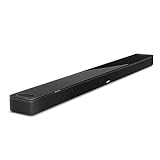
The best wireless home theater system is the Sony Bravia Theater Quad, four wireless speakers with Dolby Atmos and DTS:X and no soundbar. For a wireless 5.1 system with a traditional speaker layout, the Enclave CineHome Pro is the pick. On a budget, the Sony HT-S40R adds wireless rear speakers for much less. Every wireless speaker still needs a power outlet.
On this page
- 1. What Wireless Really Means: Power Cords Still Required
- 2. Wi-Fi, WiSA, Proprietary Links and Bluetooth
- 3. The Best Wireless Home Theater System
- 4. Wireless Home Theater System Side by Side
- 5. How We Ranked the Best Wireless Home Theater Systems
- 6. Latency and Lip Sync: The Numbers
- 7. Planning Power and Placement
- 8. Interference, Dropouts and Reliability
- 9. Can You Make a Wired System Wireless?
- 10. Who Should Go Wireless, and Who Should Run Wire
- 11. Common Mistakes to Avoid
- 12. Frequently Asked Questions
1. What Wireless Really Means: Power Cords Still Required
A traditional speaker is passive: it gets both signal and power through speaker wire from an amplifier. A wireless speaker receives the signal by radio, so it needs its own amplifier and its own power supply. In practice that means a power cord for every speaker, sub and wireless receiver module.
Here is what each system on this list actually needs:
| System | Power outlets needed | Other cables |
|---|---|---|
| Sony Bravia Theater Quad | 4 speakers and the control box, plus sub if added | HDMI eARC to control box |
| Enclave CineHome Pro | 5 (center hub, four satellites) plus sub | HDMI to TV |
| Sonos Arc Ultra kit | Bar, sub and each rear | HDMI eARC |
| Bose Smart Ultra kit | Bar, sub and two rear receivers | Short wires from receivers to rears |
| JBL Bar 1000 | Bar and sub; rears are battery-powered | HDMI |
| Sony HT-S40R | Bar and rear amplifier | Short wires from amp to rears |
Before ordering, walk your room and find outlets near each speaker location, especially behind the sofa. A thin flat extension cord along the baseboard is a common fix. If there is no outlet behind your seating and you cannot add one, the JBL Bar 1000's battery surrounds are the only fully cord-free rear option here.
2. Wi-Fi, WiSA, Proprietary Links and Bluetooth
"Wireless" covers several different technologies, and they behave very differently for home theater.
- Proprietary soundbar links (Sonos, Samsung, Bose, JBL, Sony). The bar sends audio directly to its own sub and rears over a dedicated radio link. Each brand controls both ends, so it manages latency and sync internally. Reliable, but you can only add that brand's speakers.
- WiSA (Enclave). An industry standard for wireless speakers that carries uncompressed multichannel audio on the 5 GHz band with fixed low latency. Brands can interoperate, but the standard has a smaller ecosystem.
- Wi-Fi streaming (AirPlay 2, Chromecast, Spotify Connect). Used for music from your phone or apps, not for linking surround speakers. Latency of a second or more is fine for music but useless for video.
- Bluetooth. Convenient for music, but standard codecs commonly add 100–200 milliseconds or more of delay, and Bluetooth is not designed for multichannel surround. Avoid any "wireless surround" system that depends on it for rear speakers.
The practical rule: for surround speakers, use a system with a proprietary link or WiSA. Use Wi-Fi and Bluetooth for music.
3. The Best Wireless Home Theater System

1. Sony Bravia Theater Quad
$2,000–$2,500 · Best for: Design-led living rooms that want Atmos surround without a bar or speaker cable runs
- Channels
- Four wireless speakers with virtual surround and height
- Atmos/DTS:X
- Dolby Atmos, DTS:X and IMAX Enhanced
- Subwoofer
- Optional (Sony SA-SW3 or SA-SW5)
- Inputs
- HDMI eARC on control box
The Theater Quad is the most complete answer to "I want surround sound without wires across the room." It skips the soundbar entirely: four wireless speakers, two flanking the TV and two behind your seats, plus a compact control box that connects to the TV over HDMI eARC. The only cables are power cords for the speakers and control box, plus that one HDMI lead.
Sony spreads 16 drivers across the four speakers, and the system decodes Dolby Atmos and DTS:X. Its 360 Spatial Sound Mapping creates virtual speakers between and above the physical ones, while Sound Field Optimization measures the room so the speakers adjust to where they actually sit. Because the front sound comes from two speakers spaced on either side of the screen, the soundstage is wider than any single bar can produce. The speakers are slim and wall-mountable, which suits wall-hung TVs.
The trade-off is bass. There is no subwoofer in the box, and four compact speakers cannot produce the deepest movie effects. Sony sells matching wireless subwoofers, and for films one is close to essential; it adds a fifth power outlet to your plan.
Against the Enclave CineHome Pro below, the Sony is far more modern (Atmos, DTS:X, automatic calibration) but costs much more, especially with a sub. Against the Sonos Arc Ultra, it trades a bar's convenience for real stereo separation and rear speakers out of the box. See our Sony home theater review for the full range.
Pros
- No soundbar under the screen; slim, wall-mountable speakers
- Room calibration places virtual speakers around you
- Decodes Dolby Atmos, DTS:X and IMAX Enhanced
- Good Wi-Fi streaming support
Cons
- No subwoofer included, and it really needs one
- Phantom center relies on careful front placement
- Expensive for the output you get
2. Enclave Audio CineHome Pro 5.1
$1,000–$1,500 · Best for: Renters and finished rooms where running speaker wire to the back isn't an option
- Channels
- 5.1
- Wireless
- WiSA (uncompressed 24-bit/48 kHz)
- Subwoofer
- Wireless powered subwoofer included
- Inputs
- HDMI ARC/eARC, optical, Bluetooth
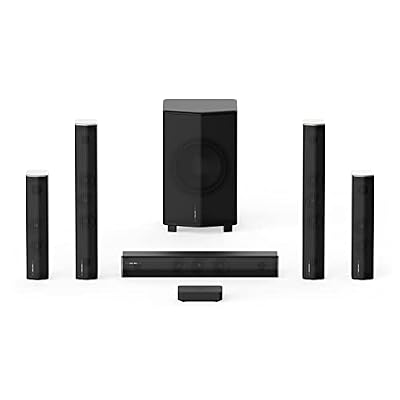
If you want a wireless home theater that looks and behaves like a traditional 5.1 speaker system, the Enclave CineHome Pro is the pick. You get a center channel that doubles as the hub, left and right front speakers, two surrounds and a subwoofer. The center connects to your TV over HDMI, and it sends audio to the other five pieces over WiSA, a dedicated wireless speaker standard.
WiSA is the reason this system works. It transmits uncompressed multichannel audio on the 5 GHz band with fixed, very low latency, around 5 milliseconds on paper, and keeps every speaker in tight sync. That is better behavior than Bluetooth by an order of magnitude.
The CineHome Pro also carries THX certification, which sets minimum standards for output and frequency response in a defined room size. It is a useful independent check in a category full of unverified claims.
The trade-offs: it decodes Dolby Digital and DTS 5.1 but has no Atmos height channels, and every piece, hub included, needs wall power, so check outlets before you buy. WiSA also shares the 5 GHz band with Wi-Fi, so a crowded network can cause occasional dropouts, as some owners report.
Against the Sony Quad, the Enclave gives you a dedicated center channel and a subwoofer in the box, which helps dialogue and bass, but lacks Atmos and auto calibration. Against the Sonos and Bose systems below, it includes every piece, sub and surrounds included, in one box. More on the Enclave Audio brand page.
Pros
- True discrete 5.1 with no speaker wire
- WiSA streams uncompressed audio with low latency
- No receiver needed; connects to the TV
- Fast, simple setup
Cons
- Every speaker needs a power outlet
- No Atmos height channels
- Less output per dollar than wired systems

3. Sonos Arc Ultra
$900–$1,000 · Best for: Living rooms that want a premium single-bar Atmos setup with room to grow
- Channels
- 9.1.4 (14 drivers)
- Atmos/DTS:X
- Dolby Atmos (no DTS:X)
- Subwoofer
- Built-in Sound Motion woofer; optional Sonos Sub 4
- Inputs
- HDMI eARC (optical via adapter), Bluetooth
Sonos is the best wireless home theater system to build in stages. Start with the Arc Ultra, a 9.1.4-rated Dolby Atmos soundbar, and add a Sonos Sub 4 and two Era 100 or Era 300 speakers as rears when the budget allows. Each addition pairs in the app in a couple of minutes.
The wireless design is smarter than it looks. Music streams over your Wi-Fi, but in home theater mode the bar talks to the sub and rears over its own dedicated wireless link, not through your router. That keeps surround audio stable even when the network is busy, and Sonos handles sync between speakers internally.
Trueplay uses the bar's microphone to tune the system for your room, and the bar adds AirPlay 2 and Bluetooth for music. The Era speakers double as standalone music speakers in other rooms when you are not watching films, which no other system here offers.
The trade-offs: there is no DTS:X decoding, there are no HDMI inputs (everything goes through your TV's eARC port), and the full kit is the most expensive wireless setup on this list once you add the sub and rears. Each rear and the sub also need an outlet.
Against the Sony Quad, the Sonos is easier to expand and better for music, while the Sony includes rear speakers from day one. See our Sonos home theater review.
Pros
- Deeper bass than any slim bar of its size, thanks to Sound Motion
- Clear dialogue and strong Atmos height for a single bar
- Trueplay room tuning, including a mic-based quick tune
- Best-in-class multiroom app; adds Sub 4 and rears wirelessly
Cons
- No DTS:X decoding
- Single HDMI eARC port, no passthrough inputs
- Full Sonos surround system gets expensive

4. Bose Smart Ultra Soundbar
$700–$900 · Best for: Viewers who struggle with dialogue and want a premium, easy-to-use Atmos bar
- Channels
- 9 drivers (incl. 2 up-firing dipole)
- Atmos/DTS:X
- Dolby Atmos (no DTS:X)
- Subwoofer
- Optional Bose Bass Module 500 or 700
- Inputs
- HDMI eARC, optical, Bluetooth
The Bose Smart Ultra Soundbar is the core of the best Bose wireless home theater system, and the pick for households where clear dialogue matters most. Its A.I. Dialogue Mode uses processing to separate voices from music and effects, then balances them so speech stays clear at low volumes. For late-night viewing or anyone who struggles with mumbled dialogue, it is the strongest feature of its kind.
The bar decodes Dolby Atmos using up-firing dipole transducers, and ADAPTiQ calibration, run with a supplied headset microphone, tunes it for your room. AirPlay 2, Chromecast built-in and Wi-Fi streaming cover music.
To make it a wireless surround system, add the Bose Bass Module 700 for low end and the Bose Surround Speakers 700 for the rears. Know how the rears work: each small speaker connects by a short wire to a wireless receiver module, which plugs into the wall. You avoid a cable across the room, but you still place two receivers and run two short wires.
The trade-offs are cost and formats. Bar, sub and rears bought separately cost more than the Samsung or JBL all-in-one kits, and Bose does not decode DTS:X. There is also no HDMI input.
Against the Sonos, Bose is the better pick for dialogue and late-night listening, while Sonos is the stronger music system. More in our Bose home theater review.
Pros
- A.I. Dialogue Mode makes voices clearer
- ADAPTiQ room tuning
- Up-firing dipole drivers for Atmos height
- Wide streaming support including Chromecast and AirPlay 2
Cons
- No DTS:X
- Bass module and rears are costly add-ons
- No HDMI inputs for sources

5. JBL Bar 1000
$800–$1,000 · Best for: Living rooms that want real rear surround without permanent rear speakers
- Channels
- 7.1.4
- Atmos/DTS:X
- Dolby Atmos and DTS:X
- Subwoofer
- 10-inch wireless subwoofer included
- Inputs
- 3x HDMI in (4K Dolby Vision pass-through), HDMI eARC, optical, Bluetooth
The JBL Bar 1000 is the only system here whose rear speakers need no outlet at all while you watch. The two surround speakers detach from the ends of the bar and run on batteries; you place them behind the sofa for a film and dock them back on the bar to recharge. JBL quotes around 10 hours per charge.
That solves the biggest practical problem with wireless rears: many living rooms have no sockets behind the seating. It also keeps the room tidy when you are not watching, since the surrounds live on the bar.
The rest of the package is strong for the money. JBL rates it 7.1.4, with up-firing drivers for Dolby Atmos height, a wireless 10-inch subwoofer, and decoding for both Dolby Atmos and DTS:X. Three HDMI inputs plus eARC let you connect a console and streaming box directly, and it supports Chromecast and AirPlay 2.
The trade-offs come with batteries. If you forget to dock the surrounds, they eventually run out mid-film, and battery capacity fades over years of charge cycles. The small surround drivers also limit rear output compared with mains-powered rears.
Against the Sonos and Bose systems, the JBL includes sub and surrounds in one box and usually costs less than either full kit. Against the Sony HT-S40R below, it adds Atmos, DTS:X and HDMI inputs for considerably more. JBL has released newer models since, but the Bar 1000 remains widely sold and well documented by owners.
Pros
- Detachable battery rears give real surround on demand
- 10-inch wireless sub included
- Three HDMI inputs plus eARC
- Decodes Dolby Atmos and DTS:X
Cons
- Rear speakers need regular recharging
- 880 W figure is a system total, not per channel
- Bulky bar when the rears are docked

6. Sony HT-S40R 5.1 Home Theater System
$300–$450 · Best for: Budget buyers who want real rear speakers for TV and movies
- Channels
- 5.1
- Atmos/DTS:X
- No
- Subwoofer
- Wired subwoofer included
- Inputs
- HDMI ARC, optical, Bluetooth
The Sony HT-S40R is the best budget wireless home theater system, and the easiest way to get real rear speakers for little money. A three-channel soundbar and wired subwoofer sit at the front. The two rear speakers connect by short cables to a wireless amplifier that you place behind the seats and plug into the wall. The bar sends surround audio to that amp wirelessly.
That design keeps cables short where it matters: no speaker wire crosses the room, and only one outlet is needed at the back. Truly wireless rears are rare in this price tier, and owners consistently report that setup takes under half an hour.
It is a proper 5.1 system, so you get a dedicated center channel for dialogue and surround effects from behind. Sony quotes 600 watts total, which is a peak figure summed across channels and not useful for comparison. Connections are HDMI ARC and optical, with Bluetooth for phones.
The trade-offs: no Dolby Atmos, no DTS:X, and ARC rather than eARC, so you are limited to compressed surround formats. For streaming and broadcast TV, which use those formats, the loss is small. The subwoofer is wired to the bar, so it sits near the front.
Against the JBL Bar 1000, you give up Atmos, HDMI inputs and battery surrounds for a fraction of the cost. If you want a wireless home theater system under $500, this is the one. More picks in our budget home theater system guide.
Pros
- Real rear speakers at a budget price
- Wireless amp avoids cable runs to the back
- Simple HDMI ARC setup
- Wired sub adds useful low-end weight
Cons
- No Dolby Atmos or DTS:X
- No Wi-Fi streaming
- 600 W claim is a total, not per-channel power
4. Wireless Home Theater System Side by Side
| Product | Score | Price | Channels | Atmos/DTS:X | Subwoofer | Surrounds | Wireless | Buy |
|---|---|---|---|---|---|---|---|---|
| Sony Bravia Theater Quad Best Overall Wireless System | 83 | $2,000–$2,500 | Four wireless speakers with virtual surround and height | Dolby Atmos, DTS:X and IMAX Enhanced | Optional (Sony SA-SW3 or SA-SW5) | Included (rear pair) | Wireless speakers (each needs power) | Amazon → |
| Enclave Audio CineHome Pro 5.1 Best Wireless 5.1 Speaker System | 76 | $1,000–$1,500 | 5.1 | No height channels (Dolby Digital and DTS 5.1) | Wireless powered subwoofer included | Included (wireless) | WiSA (uncompressed 24-bit/48 kHz) | Amazon → |
| Sonos Arc Ultra Best Wireless Ecosystem | 88 | $900–$1,000 | 9.1.4 (14 drivers) | Dolby Atmos (no DTS:X) | Built-in Sound Motion woofer; optional Sonos Sub 4 | Optional (pair of Era 100 or Era 300) | Wireless sub and rear expansion | Amazon → |
| Bose Smart Ultra Soundbar Best Bose Wireless System | 83 | $700–$900 | 9 drivers (incl. 2 up-firing dipole) | Dolby Atmos (no DTS:X) | Optional Bose Bass Module 500 or 700 | Optional Bose Surround Speakers or Surround Speakers 700 | Wireless bass module and surround expansion | Amazon → |
| JBL Bar 1000 Best Battery-Powered Surrounds | 85 | $800–$1,000 | 7.1.4 | Dolby Atmos and DTS:X | 10-inch wireless subwoofer included | Detachable battery-powered rears | Wireless sub and detachable wireless rears | Amazon → |
| Sony HT-S40R 5.1 Home Theater System Best Budget Wireless Surround | 68 | $300–$450 | 5.1 | No | Wired subwoofer included | Included (wired to a wireless rear amplifier) | Wireless rear amplifier | Amazon → |
5. How We Ranked the Best Wireless Home Theater Systems
We have not lab-tested these systems. Our ranking draws on spec sheets, room maths and owner-reported reliability, with five criteria:
- Real speaker placement. Systems with physical speakers to the sides and behind you rank above bars that simulate surround.
- Wireless link quality. Proprietary links and WiSA beat anything relying on Bluetooth for surround channels.
- Cables and outlets. Fewer power cords and shorter wires score higher.
- Format support. Dolby Atmos, DTS:X and eARC.
- Completeness. Systems that include sub and rears in the box score higher than those where you buy pieces separately.
The Sony Theater Quad ranks first for combining real front and rear speakers, Atmos and DTS:X, automatic calibration and the cleanest look. The Enclave earns second as the best traditional 5.1 layout with a sub included. The budget pick wins on value, not features.
6. Latency and Lip Sync: The Numbers
Latency is the delay between the TV showing a frame and the speaker playing its sound. Too much, and lips move before voices arrive.
How much is too much? Broadcast guidance (ITU-R BT.1359) puts the detectability threshold at roughly 45 milliseconds with sound early and 125 milliseconds with sound late. Our brains tolerate late sound better because, in real life, light always arrives before sound.
Put that in room terms. Sound travels about 1,125 feet per second, or roughly 0.9 milliseconds per foot. So:
- A WiSA link adding about 5 ms is the equivalent of moving the speaker about 5.5 feet further away, which your system's distance settings can absorb.
- A Bluetooth link adding 150 ms is like moving the speaker about 170 feet away, far beyond what any distance setting fixes.
In the soundbar systems on this list, the bar delays its own output so all speakers play together, and the TV can delay its picture to match. If lips still look off, use the lip-sync or AV sync setting on the TV or bar, adjusting in small steps.
The other sync that matters is between speakers. If the rear speakers were even a few milliseconds out of step with the front, effects would smear. Proprietary links and WiSA lock this tightly; this is where Bluetooth-based "surround" kits fail.
7. Planning Power and Placement
Wireless gives you freedom on where speakers go, so use it well.
- Front speakers (Sony Quad): place them at either side of the screen, ideally at ear height or angled toward the seats. Keep left and right at equal distances from the main seat.
- Rear speakers: put them beside or slightly behind your seats, about 1–2 feet above ear height. Dolby's guidance for 5.1 places surrounds at roughly 110 to 120 degrees from center.
- Subwoofer: wireless subs can go anywhere with an outlet. Try the "subwoofer crawl" (place the sub at your seat, play bass, and listen around the room for the smoothest spot).
- Outlets: if there is none behind the sofa, a flat extension cord under a rug or along the baseboard is the usual solution. Avoid daisy-chaining power strips.
- Calibrate last. Run Trueplay, ADAPTiQ, SpaceFit or Sound Field Optimization after everything is in its final place.
For wall-mounted TVs, the Sony Quad's front speakers and slim bars like the Arc Ultra suit flush placement. Our home theater room design guide covers layouts in more depth, and the viewing distance calculator helps place seating.
8. Interference, Dropouts and Reliability
Wireless home theater links mostly use the 5 GHz band, which they share with Wi-Fi. In a house with a single router, conflicts are rare. In an apartment block with dozens of networks, occasional dropouts are the most common owner complaint across every brand.
Ways to reduce them:
- Keep the bar or hub out of closed cabinets, which weaken the signal.
- Avoid placing the router right next to the soundbar or hub.
- If your router lets you choose channels, move Wi-Fi away from the channels your speakers favor; some systems switch automatically.
- Keep firmware current. Brands regularly fix stability issues in updates.
Battery-powered surrounds (JBL) add one more reliability factor: capacity fades over years of charging. Mains-powered rears do not have that issue. For the most dependable link overall, owners consistently rate proprietary systems from Sonos, Sony and Samsung highly, since one company controls both ends.
9. Can You Make a Wired System Wireless?
Partly. If you already own passive speakers, a wireless rear speaker kit (a transmitter at the receiver and a small amplifier near the rears) removes the cable across the room. You still run short speaker wires from that amp, and it still needs power. Some receivers can also connect wirelessly to subwoofers through a transmitter kit.
For the front of the room, powered speakers with HDMI ARC, like the Klipsch The Fives II or KEF LS50 Wireless II, replace a receiver and passive pair for stereo TV sound and music. They do not create surround on their own.
If you are starting from scratch and want proper speakers with minimal cabling, a WiSA system like the Enclave CineHome Pro is the cleanest route. Our best wireless speakers for home theater guide covers standalone powered speakers in more detail.
10. Who Should Go Wireless, and Who Should Run Wire
Go wireless if you rent, cannot run wire behind walls or under floors, share a living room where visible cables are a deal-breaker, or want a system you can move easily.
Run wire if you are building a dedicated room, want the most output and upgradability for the money, or plan in-ceiling Atmos speakers later. A passive speaker package and receiver, like the picks in our best home theater systems roundup, delivers more performance per dollar and never drops out.
Split the difference with a soundbar system that has wireless rears: the front is wired to your TV with one HDMI cable, and only the rears and sub rely on the wireless link.
11. Common Mistakes to Avoid
Assuming wireless speakers need no power
Every wireless speaker has its own amplifier and needs an outlet. Map your sockets, especially behind the seating, before buying.
Using Bluetooth for surround speakers
Bluetooth delay is far beyond lip-sync tolerance and it is not designed for multichannel audio. Use systems with proprietary links or WiSA for rears.
Hiding the hub in a closed cabinet
Wood and glass doors weaken the wireless signal and can cause dropouts. Keep the bar or hub in the open.
Skipping calibration after moving speakers
Wireless makes it easy to move speakers, but room correction assumes they stay put. Rerun calibration whenever positions change.
12. Frequently Asked Questions
What is the best wireless home theater system?
The best wireless home theater system is the Sony Bravia Theater Quad: four wireless speakers with Dolby Atmos, DTS:X and automatic room calibration, connected to the TV by one HDMI eARC cable. For a traditional wireless 5.1 layout with a sub included, choose the Enclave CineHome Pro. On a budget, the Sony HT-S40R adds wireless rears.
Do wireless home theater speakers need to be plugged in?
Yes. Wireless speakers receive audio by radio but need power for their built-in amplifiers, so each one plugs into an outlet. Some systems connect small passive speakers to a powered wireless receiver module instead. The JBL Bar 1000's detachable surrounds are an exception: they run on batteries and recharge on the bar.
Is there a delay with wireless surround sound?
There is a small delay, but good systems manage it. Proprietary soundbar links and WiSA keep latency low and synchronized across speakers, around 5 milliseconds for WiSA on paper, well within lip-sync tolerance. Bluetooth is different: standard codecs often add 100 to 200 milliseconds or more, which is why it is unsuitable for surround speakers.
Are wireless home theater systems as good as wired?
For most living rooms, the difference is small. Wired passive systems still offer more output and upgradability per dollar and never drop out, which matters in large or dedicated rooms. Wireless systems win on convenience and appearance, and proprietary or WiSA links keep sound quality and sync close to wired.
What is the best wireless home theater system under $500?
The Sony HT-S40R is the best wireless home theater system under $500. It pairs a three-channel soundbar and subwoofer with two rear speakers that connect to a wireless amplifier, giving you real 5.1 without cable across the room. It lacks Dolby Atmos and eARC, which matters mainly for 4K Blu-ray.
Can I add wireless rear speakers to my soundbar?
Often, yes, if your soundbar supports it. Sonos, Bose, Samsung, Sony and others sell matching wireless rears and subs that pair with their bars. You generally cannot mix brands. If your bar has no expansion option, a full wireless system or a receiver with a wireless rear kit is the alternative.
What is the best wireless Dolby Atmos home theater system?
The Sony Bravia Theater Quad is the best wireless Dolby Atmos system for a soundbar-free setup. If you prefer a soundbar, the JBL Bar 1000 offers 7.1.4 with battery-powered detachable surrounds, and a Sonos Arc Ultra with a Sub 4 and Era 300 rears is the most expandable option.
Related Guides
Wireless Speakers
Best Wireless Speakers for Home Theater
The best wireless speakers for home theater in 2026: 7 WiSA systems, wireless surrounds and powered pairs, with the truth about power, latency and lock-in.
Soundbars
Best Soundbar for Home Theater
The best soundbar for home theater in 2026: eight bars and soundbar systems ranked on real channels, subwoofer, eARC and expandability, from Sonos to Samsung.
Home Theater Systems
Best Home Theater Systems
The best home theater systems for 2026, from all-in-one Atmos soundbar kits to 5.1 speaker packages. Eight picks ranked on spec-sheet maths and room size.
The Bottom Line
The best wireless home theater system is the Sony Bravia Theater Quad: four wireless speakers, Atmos and DTS:X, and no soundbar under the screen. The Enclave CineHome Pro is the best traditional wireless 5.1 system, the Sonos Arc Ultra is the most expandable ecosystem, the Bose Smart Ultra Soundbar leads on dialogue, the JBL Bar 1000 has battery surrounds that need no outlet, and the Sony HT-S40R is the budget route. Whichever you choose, plan a power outlet for every speaker.
More in Home Theater Systems
Home Theater Systems
Best Budget Home Theater System
The best budget home theater system for 2026: six cheap, affordable picks from 5.1.2 Atmos soundbars to a receiver bundle, ranked on channels per dollar.
Home Theater Systems
Best Dolby Atmos Home Theater System
The best Dolby Atmos home theater system for 2026, from 5.1.2 speaker packages to 11.1.4 soundbar kits. Seven picks ranked by real height channels, not hype.