Wireless Speakers
Best Wireless Speakers for Home Theater
We research every product against its spec sheet and independent measurements. When you buy through our links we may earn a commission, at no cost to you. How we score · Disclosure
The best wireless speakers for home theater are the ones that cut the long speaker-wire runs to the back of the room without adding lip-sync problems or trapping you in an ecosystem you will regret. Our top pick is the Enclave Audio CineHome Pro 5.1, a true five-speaker-plus-sub system that connects to your TV over HDMI eARC and needs no receiver at all.
This guide is for anyone who wants surround sound but cannot run wires behind the sofa, or who wants a simpler alternative to an AV receiver and passive speakers. One thing first: "wireless" speakers still need power, so every speaker on this list plugs into an outlet or a wired power module.
Our top picks at a glance


Quick answer
The best wireless speakers for home theater for most people are the Enclave CineHome Pro 5.1, a WiSA-based system with a real center speaker and subwoofer that plugs into your TV's HDMI eARC port. For Dolby Atmos without wires to the rear, the Sony Bravia Theater Quad is the strongest option. If you already own a Sonos soundbar, add Sonos Era 300 speakers as surrounds.
On this page
- 1. What Wireless Home Theater Speakers Really Are
- 2. The Best Wireless Speakers for Home Theater
- 3. Wireless Speakers for Home Theater Side by Side
- 4. How We Chose the Best Wireless Speakers for Home Theater
- 5. Latency and Lip Sync
- 6. Ecosystem Lock-In
- 7. Wireless Rear Speakers for an Existing System
- 8. Plan Your Power Outlets First
- 9. Who Should Buy Wireless Speakers and Who Should Skip Them
- 10. Common Mistakes to Avoid
- 11. Frequently Asked Questions
1. What Wireless Home Theater Speakers Really Are
"Wireless" covers three very different kinds of product, and knowing which one you are buying avoids most disappointments.
- Complete wireless surround systems such as the Enclave CineHome Pro and Sony Bravia Theater Quad. A hub connects to your TV over HDMI and sends audio wirelessly to each speaker. No receiver needed.
- Wireless surrounds for a soundbar, such as Sonos Era and Bose Surround Speakers 700. They add rear channels to a specific brand's soundbar.
- Powered stereo speakers such as the KEF LS50 Wireless II and Klipsch The Fives II. They have built-in amplifiers and stream music wirelessly, but they are a stereo pair, not a surround system.
The rule that applies to all three: wireless speakers still need power. Every speaker contains its own amplifier, so each one needs an outlet or a wired power module nearby. What you save is the long run of speaker wire from the front of the room to the back.
Two other things to check before buying: latency, which affects lip sync, and ecosystem lock-in, which decides what you can add or keep later. Both are covered below.
2. The Best Wireless Speakers for Home Theater
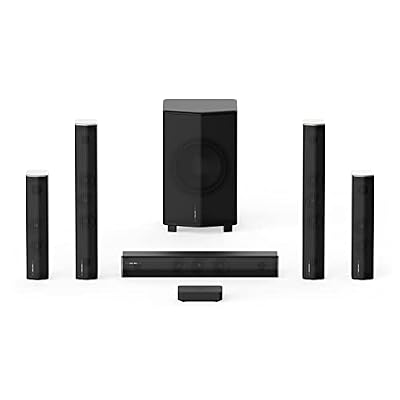
1. Enclave Audio CineHome Pro 5.1
$1,000–$1,500 · Best for: Renters and finished rooms where running speaker wire to the back isn't an option
- Channels
- 5.1
- Wireless
- WiSA (uncompressed 24-bit/48 kHz)
- Subwoofer
- Wireless powered subwoofer included
- Inputs
- HDMI ARC/eARC, optical, Bluetooth
The Enclave CineHome Pro is the closest wireless equivalent to a traditional 5.1 speaker system. You get five separate speakers plus a wireless subwoofer, with the center channel acting as the hub. It connects to your TV through HDMI eARC, decodes Dolby Digital and DTS surround, and sends audio to each speaker over the WiSA wireless standard, which was designed specifically for low, fixed-latency multichannel audio.
That real center speaker is why it wins. Soundbar-based systems and four-speaker designs either fold dialogue into the bar or create a phantom center. A dedicated center channel keeps voices locked to the screen for everyone on the sofa, which is the single most important thing a home theater does.
The trade-offs are clear. Every speaker needs an AC outlet nearby, so "wireless" means no speaker wire, not no cables. It is a 5.1 system without Dolby Atmos height channels, and it is tied to the WiSA ecosystem, so you cannot mix in other brands' speakers or move to a receiver later and keep using them as passive speakers. Compared with the Sony Bravia Theater Quad below, the Enclave gives you a proper center and sub; the Sony gives you Atmos.
Pros
- True discrete 5.1 with no speaker wire
- WiSA streams uncompressed audio with low latency
- No receiver needed; connects to the TV
- Fast, simple setup
Cons
- Every speaker needs a power outlet
- No Atmos height channels
- Less output per dollar than wired systems

2. Sony Bravia Theater Quad
$2,000–$2,500 · Best for: Design-led living rooms that want Atmos surround without a bar or speaker cable runs
- Channels
- Four wireless speakers with virtual surround and height
- Atmos/DTS:X
- Dolby Atmos, DTS:X and IMAX Enhanced
- Subwoofer
- Optional (Sony SA-SW3 or SA-SW5)
- Inputs
- HDMI eARC on control box
The Sony Bravia Theater Quad is the most advanced wireless home theater speaker system here. It uses four slim wireless speakers and a compact control box that connects to your TV over HDMI eARC, and it supports Dolby Atmos and DTS:X. Sony's 360 Spatial Sound Mapping uses the four speakers to create virtual height and surround positions, and Sound Field Optimization measures the room with built-in microphones to tune the result.
The speakers are thin enough to wall-mount, which makes the system work in living rooms where floor space is tight. You can add an optional Sony wireless subwoofer for deeper bass, and with a compatible Bravia TV, Sony's Acoustic Center Sync lets the TV's own speakers act as the center channel.
The trade-off is the center. Without a Bravia TV, dialogue comes from a phantom center created by the two front speakers, which works well in the middle seat but less well at the ends of a wide sofa. It is also expensive and works best within Sony's ecosystem. Compared with the Enclave, the Quad wins on Atmos and calibration; the Enclave wins on dialogue anchoring for wide seating. See our Sony home theater review for the wider lineup.
Pros
- No soundbar under the screen; slim, wall-mountable speakers
- Room calibration places virtual speakers around you
- Decodes Dolby Atmos, DTS:X and IMAX Enhanced
- Good Wi-Fi streaming support
Cons
- No subwoofer included, and it really needs one
- Phantom center relies on careful front placement
- Expensive for the output you get

3. Sonos Era 300
$400–$500 · Best for: Sonos Arc, Arc Ultra or Beam (Gen 2) owners who want rear height effects
- Type
- Powered wireless smart speaker (spatial audio)
- Drivers
- 4 tweeters (1 up-firing) + 2 woofers
- Home theater role
- Atmos rear surrounds for Sonos Arc, Arc Ultra and Beam (Gen 2)
- Inputs
- Wi-Fi, Bluetooth, USB-C line-in (adapter)
If you already own a Sonos soundbar, a pair of Era 300s are the best wireless rear speakers you can add. Each Era 300 has six drivers: four tweeters and two woofers, including an up-firing tweeter, and when paired as surrounds with an Arc Ultra or Arc they add height information to the rear channels in Dolby Atmos content. No other wireless surround speaker here does that.
Setup is simple: the Sonos app pairs the speakers to the bar over Wi-Fi, and Trueplay tuning adjusts them for the room. Each Era 300 also works as a standalone smart speaker for music in other rooms, with Bluetooth and a USB-C line-in.
The trade-off is lock-in. Era 300s only work as surrounds with a Sonos soundbar or Sonos Amp; they cannot connect to an AV receiver or another brand's bar. They are also among the most expensive surround options, and each speaker needs its own outlet. Sonos supports Dolby Atmos but not DTS:X. Compared with the Era 100 below, the Era 300 adds rear height effects; the Era 100 delivers solid surrounds for much less. Our Sonos home theater review covers the full ecosystem.
Pros
- Up-firing tweeter adds rear height in Sonos Atmos systems
- Excellent spatial audio for Atmos music
- Trueplay tuning, Wi-Fi and Bluetooth
- USB-C line-in for a turntable or other source
Cons
- Expensive as a rear pair
- Needs a clear top surface for the up-firing driver
- Unusual shape is awkward on shelves

4. KEF LS50 Wireless II
$2,300–$2,800 · Best for: Audiophiles who want top-tier stereo for music and TV from one system
- Drivers
- 5.25-inch Uni-Q (0.75-inch aluminum tweeter in magnesium-aluminum cone) with MAT
- Amplification
- 380 W per speaker (100 W tweeter, 280 W woofer)
- Frequency response
- 45 Hz–28 kHz ±3 dB
- Inputs
- HDMI eARC, optical, coaxial, analog, Ethernet, Bluetooth, sub out
Not everyone needs surround. If you want a stereo pair that sounds superb with music and still lifts movies far beyond TV speakers, the KEF LS50 Wireless II is the best choice. Each speaker has a Uni-Q driver with MAT (a 0.75-inch aluminum tweeter in a 5.25-inch magnesium-aluminum cone), powered by 380 watts per speaker (280 W for the woofer, 100 W for the tweeter) with digital active crossovers.
It connects to your TV over HDMI eARC, so the TV remote controls volume, and the two speakers can link to each other wirelessly, which means only the primary speaker needs a cable from the TV. A subwoofer output lets you add a sub such as the SVS SB-1000 Pro for movie bass.
The trade-off is that this is a 2.0 or 2.1 system: no center, no surrounds, no Atmos. Dialogue comes from a phantom center, which works well if you sit between the speakers. Both speakers also still need power. Compared with the Klipsch The Fives II below, the KEF is the more refined music speaker and links its two speakers wirelessly; the Fives II cost much less and add HDMI 2.1 passthrough for gaming.
Pros
- Uni-Q drivers give a wide, stable sweet spot
- 380 W per speaker with excellent measured performance
- HDMI eARC plus every major streaming service
- Sub output with app-based crossover
Cons
- Expensive
- Stereo only, no surround decoding
- Deep movie bass still needs a sub

5. Klipsch The Fives II Powered Speakers
$850–$950 · Best for: Stereo TV and gaming setups that want HDMI 2.1 and streaming in two speakers
- Type
- Powered bookshelf speakers (pair) with built-in AVR processing
- Drivers
- 5.25-inch woofer (per speaker)
- Inputs
- HDMI 2.1 eARC with passthrough (4K/120, VRR, ALLM, HDR)
- Home theater role
- Stereo TV speakers with Dolby Atmos processing via HDMI eARC
Klipsch The Fives II, the successor to The Fives on this list, are powered bookshelf speakers that connect straight to your TV over HDMI 2.1 eARC, so the TV remote controls volume and you need no receiver. They are rebuilt around Onkyo-designed AVR electronics, and each speaker has a 5.25-inch woofer behind a one-piece BMC baffle. That woofer has about 1.36 times the cone area of the original's 4.5-inch driver, roughly 1.3 dB more output at the same excursion.
HDMI 2.1 is the reason to pick them over other powered pairs. A console or streaming box plugged into the speakers keeps 4K/120, VRR, ALLM and HDR passthrough, so you do not trade gaming features for sound. Streaming is broad: Google Cast, AirPlay 2, Spotify Connect, Tidal Connect and Qobuz Connect.
Here is the honest part: they decode Dolby Atmos, but with no up-firing drivers the height effects are virtual. This is a stereo pair with spatial processing, not a surround system, so dialogue comes from a phantom center. Klipsch's listing does not describe a wireless link between the two speakers, and each one needs power. For deep movie bass, add a sub such as the Klipsch R-120SW.
Compared with the KEF LS50 Wireless II above, the Fives II cost far less and add HDMI 2.1 passthrough; the KEF is the more refined music speaker. For wire-free surround, the Enclave and Sony systems above are the answer.
Pros
- HDMI 2.1 eARC with 4K/120, VRR and ALLM passthrough
- Google Cast, AirPlay 2, Spotify, Tidal and Qobuz Connect built in
- Larger 5.25-inch woofers than the original Fives
- Rigid one-piece BMC baffle
Cons
- Atmos height effects are virtual with two speakers
- Costs more than a good soundbar
- Needs a subwoofer for deep movie bass

6. Bose Surround Speakers 700
$500–$600 · Best for: Owners of a Bose smart soundbar who want discreet, real rear surrounds
- Type
- Wireless rear surround speakers (pair)
- Home theater role
- Rear surrounds for Bose smart soundbars
- Amplification
- Powered wireless receiver module
- Inputs
- Wireless link from a compatible Bose soundbar
The Bose Surround Speakers 700 are the rear speakers to buy if you own a Bose smart soundbar such as the Bose Smart Ultra Soundbar. They are small, discreet speakers that connect to two wireless receiver modules, which communicate with the soundbar and plug into the wall for power.
That design shows what "wireless rear speakers" usually means in practice. The soundbar sends audio wirelessly to each receiver module, but each module connects to its speaker with a short speaker wire, and each module needs an outlet. You avoid running wire across the room, but you still need power at the back.
The payoff is real surround: ambience, fly-bys and rain come from behind you rather than being simulated by the bar, which makes a bigger difference to immersion than most soundbar upgrades. Bose's speakers are also compact enough to sit on shelves or wall brackets without dominating a room.
The trade-off is lock-in: these only work with compatible Bose soundbars. Compared with Sonos Era speakers, the Bose speakers are smaller and less versatile, since they do not double as music speakers. Pair them with a Bose Bass Module 700 for a full Bose 5.1. See our Bose home theater review.
Pros
- Genuine rear surround effects for Bose bars
- Very compact, wall-mountable speakers
- Wireless link from the soundbar
- Premium aluminum finish
Cons
- Only work with Bose smart soundbars
- Expensive for the size
- Receiver module still needs a power outlet

7. Sonos Era 100
$200–$250 · Best for: Sonos soundbar owners who want affordable wireless rear surrounds
- Type
- Powered wireless smart speaker
- Drivers
- 2 angled tweeters + 1 woofer
- Home theater role
- Rear surrounds for Sonos soundbars
- Inputs
- Wi-Fi, Bluetooth, USB-C line-in (adapter)
If you have a Sonos soundbar and want wireless rear speakers without paying for Era 300s, the Era 100 is the sensible choice. Each speaker has two angled tweeters and one woofer, and paired as surrounds with a Sonos bar, it adds proper rear ambience and directional effects.
For most rooms, the Era 100 delivers most of what matters in a surround speaker. Surround channels carry atmosphere, crowd noise and fly-bys rather than dialogue, and the bar and subwoofer handle the heavy lifting. Like the Era 300, each Era 100 doubles as a standalone smart speaker with Bluetooth and a USB-C line-in, so you can move them to other rooms when you are not watching films.
The trade-off compared with the Era 300 is height: the Era 100 has no up-firing driver, so it does not add overhead information to the rear channels in Atmos content. It shares the same lock-in: it only works as a surround with a Sonos soundbar or Amp, and each speaker needs an outlet. Paired with a Sonos Beam (Gen 2) or Arc Ultra and, later, a Sonos Sub 4, it builds a complete wireless system one step at a time.
Pros
- Most affordable Sonos rear surround option
- Stereo playback from a single speaker
- Bluetooth and USB-C line-in
- Trueplay tuning
Cons
- No height channel as rears
- Limited deep bass
- Each speaker needs a power outlet
3. Wireless Speakers for Home Theater Side by Side
| Product | Score | Price | Inputs | Streaming | Amplification | Type | Buy |
|---|---|---|---|---|---|---|---|
| Enclave Audio CineHome Pro 5.1 Best Overall Wireless 5.1 | 76 | $1,000–$1,500 | HDMI ARC/eARC, optical, Bluetooth | Bluetooth | Built into each speaker | — | Amazon → |
| Sony Bravia Theater Quad Best for Dolby Atmos | 83 | $2,000–$2,500 | HDMI eARC on control box | Wi-Fi, Chromecast built-in, AirPlay, Spotify Connect, Bluetooth | Built in (active system) | — | Amazon → |
| Sonos Era 300 Best Wireless Rear Speakers for Sonos | 82 | $400–$500 | Wi-Fi, Bluetooth, USB-C line-in (adapter) | AirPlay 2, Spotify Connect, Sonos app | 6 Class-D amplifiers | Powered wireless smart speaker (spatial audio) | Amazon → |
| KEF LS50 Wireless II Best Wireless Stereo for Movies and Music | 88 | $2,300–$2,800 | HDMI eARC, optical, coaxial, analog, Ethernet, Bluetooth, sub out | AirPlay 2, Chromecast, Spotify Connect, Tidal Connect, Roon Ready | 380 W per speaker (100 W tweeter, 280 W woofer) | Active wireless stereo speakers (pair) | Amazon → |
| Klipsch The Fives II Powered Speakers Best Powered HDMI Speakers for TV and Gaming | 83 | $850–$950 | HDMI 2.1 eARC with passthrough (4K/120, VRR, ALLM, HDR) | Google Cast, AirPlay 2, Spotify Connect, Tidal Connect, Qobuz Connect | Built-in Onkyo-designed amplification | Powered bookshelf speakers (pair) with built-in AVR processing | Amazon → |
| Bose Surround Speakers 700 Best Add-On for Bose Soundbars | 70 | $500–$600 | Wireless link from a compatible Bose soundbar | None (via Bose soundbar) | Powered wireless receiver module | Wireless rear surround speakers (pair) | Amazon → |
| Sonos Era 100 Best Budget Sonos Surrounds | 77 | $200–$250 | Wi-Fi, Bluetooth, USB-C line-in (adapter) | AirPlay 2, Spotify Connect, Sonos app | 3 Class-D amplifiers | Powered wireless smart speaker | Amazon → |
4. How We Chose the Best Wireless Speakers for Home Theater
These picks are built on manufacturer specs and owner-reported experience, not lab measurements. We weighted:
- Real channel count: a dedicated center and real rear speakers score higher than virtual surround.
- Connection: HDMI eARC or ARC to the TV, rather than Bluetooth, for reliable lip sync.
- Format support: Dolby Atmos and DTS where available.
- Lock-in: whether speakers work with other gear or only with one brand's soundbar.
- Reliability and setup: owner reports on dropouts, firmware and app quality.
The Enclave wins because it combines a real center with true wireless surrounds and an HDMI eARC connection, the combination most buyers are actually looking for.
5. Latency and Lip Sync
Every wireless link adds some delay, and if audio arrives noticeably after the picture, voices no longer match lips. How much delay you get depends on the technology.
- Bluetooth typically adds well over 100 milliseconds with common codecs, which is enough to produce visible lip-sync error unless the TV compensates. Use it for music, not movies.
- WiSA was designed for multichannel home theater, with low, fixed latency of a few milliseconds, so the system can align audio with the picture predictably.
- Proprietary soundbar links from Sonos, Bose and Sony are synchronized by the soundbar itself, which also handles lip-sync correction with the TV over HDMI.
If you notice drift, check that the TV is sending audio over HDMI ARC or eARC rather than Bluetooth, and use the lip-sync or audio-delay setting on the TV or the speaker system's app. An eARC connection is the most reliable, because it carries lip-sync information between the TV and the speaker system automatically.
6. Ecosystem Lock-In
This is the hidden cost of wireless. Passive speakers work with any receiver for decades. Wireless speakers only work with the platform they were designed for.
| Speaker | Works with |
|---|---|
| Sonos Era 100 and Era 300 | Sonos soundbars and Sonos Amp only (as surrounds) |
| Bose Surround Speakers 700 | Compatible Bose smart soundbars only |
| Enclave CineHome Pro | WiSA hubs and transmitters |
| Sony Bravia Theater Quad | Its own control box; optional Sony subwoofers |
| KEF LS50 Wireless II, Klipsch The Fives II | Any TV with HDMI ARC/eARC; the KEF adds a standard sub output |
Before you commit, ask: if the company changes its app, ends support or the hub fails, what still works? Powered stereo speakers with HDMI and analog inputs are the most future-proof. Soundbar ecosystems are convenient but tie every future purchase to one brand. If flexibility matters most, a traditional receiver and passive speakers, covered in our best home theater speakers guide, remain the most open option.
7. Wireless Rear Speakers for an Existing System
Many people searching for wireless rear speakers already own front speakers or a soundbar. Your options depend on what you have.
- Sonos soundbar: add Era 100 or Era 300 speakers, or a Sonos Amp driving passive speakers.
- Bose smart soundbar: add Bose Surround Speakers 700.
- Other soundbars: check whether the maker sells matching wireless rears; most do not work across brands.
- AV receiver with passive speakers: there is no truly universal wireless surround standard. Third-party wireless speaker kits send the receiver's surround signal to a small amplifier at the back of the room, which then needs power and a short speaker wire. Often the simpler fix is a flat, paintable speaker wire run along the baseboard or under a rug. See our speaker wire guide.
If you are starting from scratch and want a complete wire-free package, see our best wireless home theater system guide.
8. Plan Your Power Outlets First
Because every wireless speaker needs power, outlet placement decides where your speakers can go. Before you buy:
- Map the outlets near each planned speaker position, especially behind or beside the seating.
- Avoid long extension cords across walkways; they defeat the purpose of going wireless.
- Consider a small, tidy power strip behind the sofa for both rear speakers, ideally one with surge protection. Our surge protector guide has options.
- Mind Wi-Fi congestion for Sonos systems: a strong, stable network matters as much as speaker placement.
Rear speakers should still follow the usual surround rules: roughly beside or slightly behind the seats, about 1 to 2 feet above seated ear height, angled toward the listening position.
9. Who Should Buy Wireless Speakers and Who Should Skip Them
Buy wireless speakers if:
- You cannot run wire to the rear of the room, for example in a rental or an open-plan living space.
- You want a simple system without an AV receiver.
- You already own a Sonos or Bose soundbar and want real surrounds.
Skip them if:
- You can run speaker wire. A receiver and passive speakers will sound better per dollar and last longer.
- You want the flexibility to mix brands or upgrade one speaker at a time.
- You have no outlets near the rear seats and do not want visible power cables.
For more on the trade-offs between a bar-based system and separate speakers, see soundbar vs home theater.
10. Common Mistakes to Avoid
Assuming wireless means no cables
Every wireless speaker needs power. Check outlet locations before you buy, especially behind the sofa, or you will end up running extension cords instead of speaker wire.
Using Bluetooth for movies
Bluetooth adds enough delay to cause lip-sync problems. Connect wireless systems and powered speakers to the TV over HDMI ARC or eARC, and keep Bluetooth for music streaming.
Buying surrounds that do not work with your soundbar
Sonos surrounds only work with Sonos bars, and Bose surrounds only with compatible Bose bars. Confirm compatibility before buying, because cross-brand wireless surrounds generally do not exist.
Expecting a phantom center to work for every seat
Four-speaker and stereo systems create a phantom center between the front speakers. It works well in the middle seat but less well at the ends of a wide sofa. If several people watch together, choose a system with a real center.
Ignoring Wi-Fi quality
Systems that use your home network, such as Sonos, depend on a stable signal. Dropouts are usually a router issue. Place the router well, or use a wired connection to the soundbar where possible.
11. Frequently Asked Questions
What are the best wireless speakers for home theater?
The best wireless speakers for home theater for most people are the Enclave CineHome Pro 5.1, which gives you a real center, wireless surrounds and a subwoofer over HDMI eARC. For Dolby Atmos, the Sony Bravia Theater Quad is the best wireless option. If you own a Sonos soundbar, Sonos Era 300 speakers make the best rear surrounds.
Do wireless home theater speakers need to be plugged in?
Yes. Wireless home theater speakers receive their audio signal wirelessly, but each one has a built-in amplifier that needs power. Every speaker, or the wireless receiver module it connects to, must plug into an outlet. What you avoid is running speaker wire from the front of the room to the back.
Can I add wireless speakers to my AV receiver?
Not directly. There is no universal wireless standard for receivers. Third-party kits send the surround signal from your receiver to a small amplifier at the rear, which drives passive speakers with a short wire. Often, a flat speaker wire hidden under a rug or along the baseboard is simpler and sounds better.
Is there a delay with wireless speakers?
Systems designed for home theater, such as WiSA and soundbar ecosystems, keep latency low and synchronized, so lip sync stays correct. Bluetooth is different: it often adds over 100 milliseconds of delay, which causes visible lip-sync errors. Always connect to the TV through HDMI ARC or eARC for movies.
Are wireless speakers as good as wired speakers for home theater?
Wired passive speakers with a good receiver still offer better sound per dollar and more upgrade flexibility. Wireless systems trade some of that for convenience. The best wireless systems, such as the Sony Bravia Theater Quad and Enclave CineHome Pro, sound excellent, but they lock you into one platform.
Can I use Sonos speakers as surrounds with any soundbar?
No. Sonos Era 100 and Era 300 speakers only work as surrounds with Sonos soundbars, such as the Arc Ultra, Arc, Beam and Ray, or with a Sonos Amp. They cannot be paired with another brand's soundbar or an AV receiver as surrounds.
Do wireless home theater systems support Dolby Atmos?
Some do. The Sony Bravia Theater Quad supports Dolby Atmos and DTS:X, and Sonos and Bose soundbars with wireless surrounds support Dolby Atmos. WiSA systems like the Enclave CineHome Pro are 5.1 systems without Atmos height channels, and powered pairs like the Klipsch The Fives II decode Atmos but render height virtually.
Related Guides
Home Theater Systems
Best Wireless Home Theater System
The best wireless home theater system for 2026: six picks ranked on placement, latency and wireless link, and why wireless speakers still need power.
Soundbars
Best Soundbar for Home Theater
The best soundbar for home theater in 2026: eight bars and soundbar systems ranked on real channels, subwoofer, eARC and expandability, from Sonos to Samsung.
Bookshelf Speakers
Best Home Theater Speakers
The best home theater speakers for 2026: 8 packages, towers, bookshelf and center picks, plus the sensitivity and amp-power maths to build a matched 5.1.
The Bottom Line
The best wireless speakers for home theater for most rooms are the Enclave CineHome Pro 5.1, a real center-and-surrounds system that plugs into your TV over HDMI eARC. Choose the Sony Bravia Theater Quad for wireless Dolby Atmos, the Sonos Era 300 or cheaper Era 100 if you own a Sonos soundbar, and the Bose Surround Speakers 700 for Bose bars. For stereo, the KEF LS50 Wireless II is the refined music choice, and the Klipsch The Fives II add HDMI 2.1 passthrough for gaming for much less. Remember that every wireless speaker needs power, use HDMI rather than Bluetooth, and check what ecosystem you are buying into.